Govern automatically
Classify PII / PCI / PHI on every table. Mask sensitive columns by default. Enforce policies per destination.

Scheduled exports to email, Slack, SFTP, and cloud storage. Reverse ETL to Salesforce, HubSpot, Iterable, Braze, Zendesk, Marketo, Klaviyo, and Segment. Whole-database replication to cloud storage. PII detection, policy enforcement, and approval workflows on every delivery. Your data never leaves Snowflake.
Classify PII / PCI / PHI on every table. Mask sensitive columns by default. Enforce policies per destination.
Route sensitive exports through an approval queue. Approvers see the full query before clicking Allow.
Push Snowflake records straight to Salesforce, HubSpot, Iterable, Braze, Zendesk, Marketo, Klaviyo, and Segment. Same compliance loop applies. No external ETL tool.
Every delivery — including blocks and warnings — lands in a queryable audit log.
PII, PCI, PHI, and credential columns in your source tables are detected automatically using 45 built-in rules. Mask-by-default applies the right transform on every delivery — email, Slack, Teams, webhook, SFTP, or file write. Every export writes a compliance audit row; a new Reports tab gives compliance officers a filterable view with CSV export for external GRC workflows.
45 built-in rules cover PII, PCI, PHI, and credentials. Extendable with custom patterns. Detected matches surface in the wizard before the export runs.
Last-4 for cards. Redaction for names. Hashing for medical IDs (preserves joins downstream). Domain-only for emails. All applied uniformly across delivery channels.
Every export logs who, what, to where, and with what masking. Filterable Reports view for compliance officers, CSV export for Drata / Vanta / OneTrust ingestion.
Non-breaking migration. Existing v1.x scheduled exports keep their original cleartext behavior on upgrade. Masking is opt-in for legacy schedules and default-on for new schedules created after the upgrade. Roll out at whatever cadence fits your audit calendar.
Runs on Snowflake Standard edition. All data and processing stay inside your Snowflake account — same architecture and trust posture as v1.x. Read the full v2.0 release notes →
SnowExporter v1.3 writes the query, picks the schedule, and routes it to the right Slack channel, Teams chat, or email — all without leaving Snowflake.
"Email me the top 10 customers by revenue every Monday at 9 AM Eastern."
Snowsight Copilot writes SQL. SnowExporter's AI writes the whole job — query, schedule, destination. You review every field before clicking Schedule; nothing is auto-submitted.
Powered by Snowflake Cortex (mistral-large) — runs server-side inside your
Snowflake account, so your data stays inside the boundary just like the rest of the app.
Requires Cortex on your Snowflake account. Pro / Trial only.
SnowExporter doesn't lock you into a single export channel. Pick the category that fits the recipient and the data volume.
In-body — results render directly in the email body, up to 50 rows per send. Download link — presigned URL to a file in an internal stage, no row limit. Recipients must be verified Snowflake user emails.
Slack channel — results in a monospace table, up to 10 rows + summary. Microsoft Teams channel — same shape via Teams MessageCards. Larger results get an optional downloadable file via a 24-hour presigned link.
Webhook — HTTPS POST to your endpoint with signed-secret auth and retry-on-5xx. SFTP — secure file transfer to your server with password or SSH-key auth. Same file format options as cloud exports.
Write a CSV or JSON file — optionally GZIP'd, optionally with a timestamp suffix — to an internal Snowflake stage or an external AWS S3, GCP GCS, or Azure Blob destination.
SnowExporter runs inside your Snowflake account. There is no third-party server that touches your data. The app requests only three account-level privileges, all explicitly scoped to what it needs.
Third-party ETL platforms, BI extracts, and custom export scripts all share the same pattern: they pull your data out of Snowflake, process it on infrastructure you don't control, then push it onward.
SELECT, sometimes warehouse managementSnowExporter runs inside your Snowflake account as a Native App. No third-party server in the loop. The Snowflake boundary is the security boundary.
CREATE DATABASE, no MANAGE WAREHOUSES, no schema-wide grantsACCOUNT_USAGE — same surface as your other Snowflake activityACCOUNTADMIN sees exactly what's being granted; the app's UI generates the SQL for each step
For full transparency, here are the only three privileges the app's
manifest.yml requests:
IMPORTED PRIVILEGES ON SNOWFLAKE DB
Read ACCOUNT_USAGE.QUERY_ATTRIBUTION_HISTORY so the audit log can show real
compute credits per query.
EXECUTE TASKRun scheduled exports as Snowflake tasks.
EXECUTE MANAGED TASKRun scheduled exports as serverless managed tasks when a warehouse is granted.
From query to delivery — here's what SnowExporter looks like inside Snowsight.
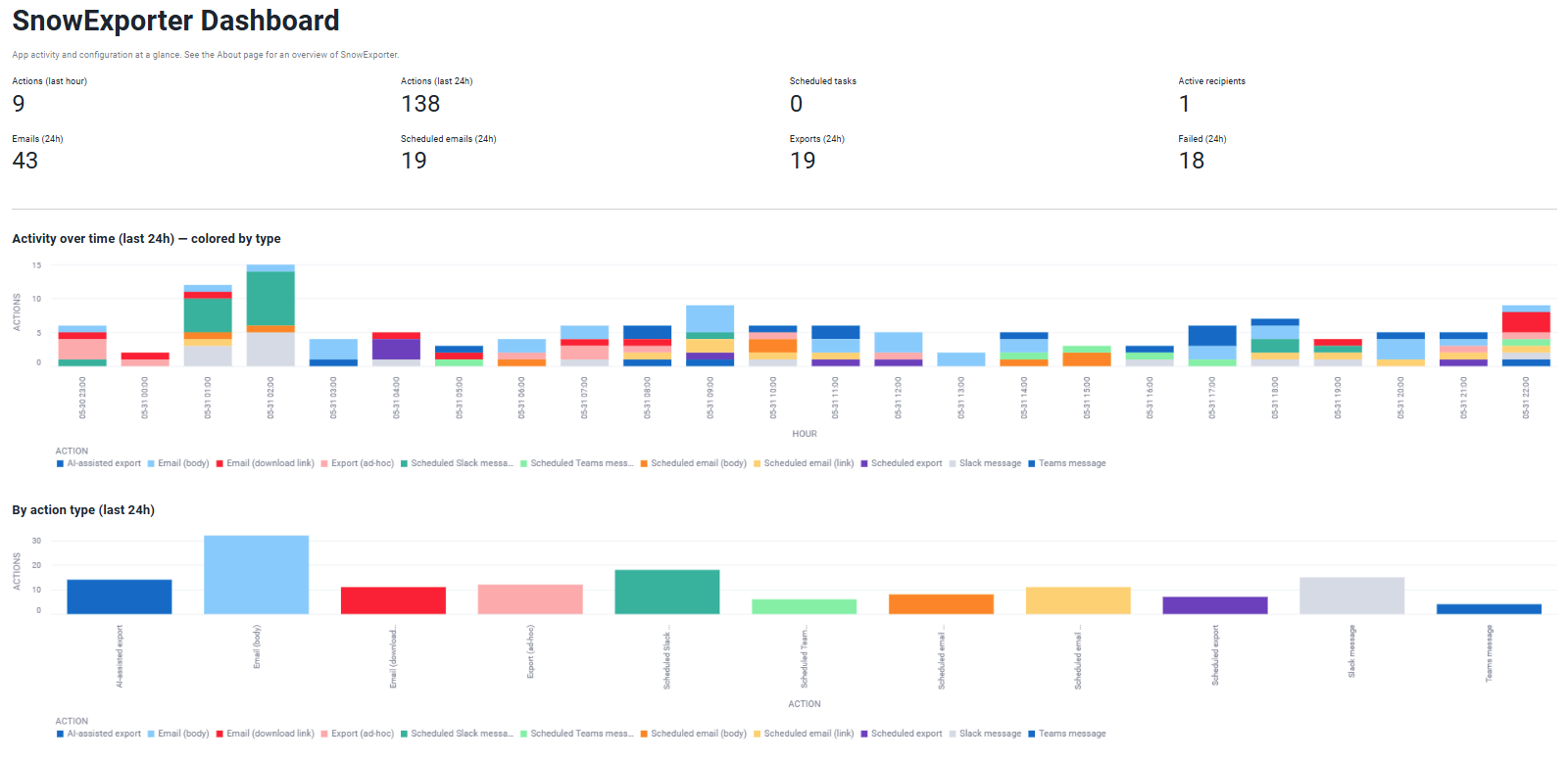
ACCOUNT_USAGE, quick-access to common actions.
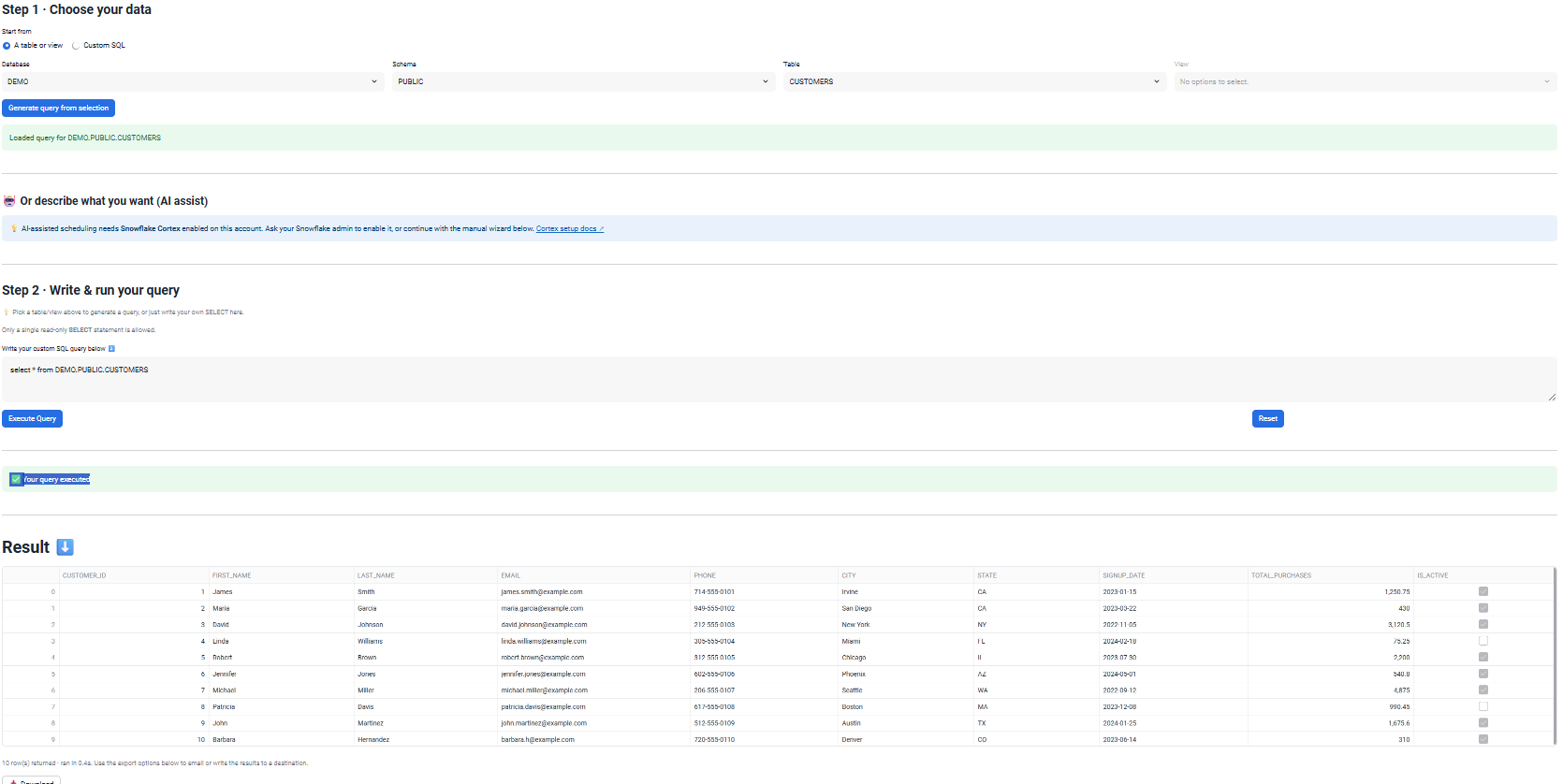
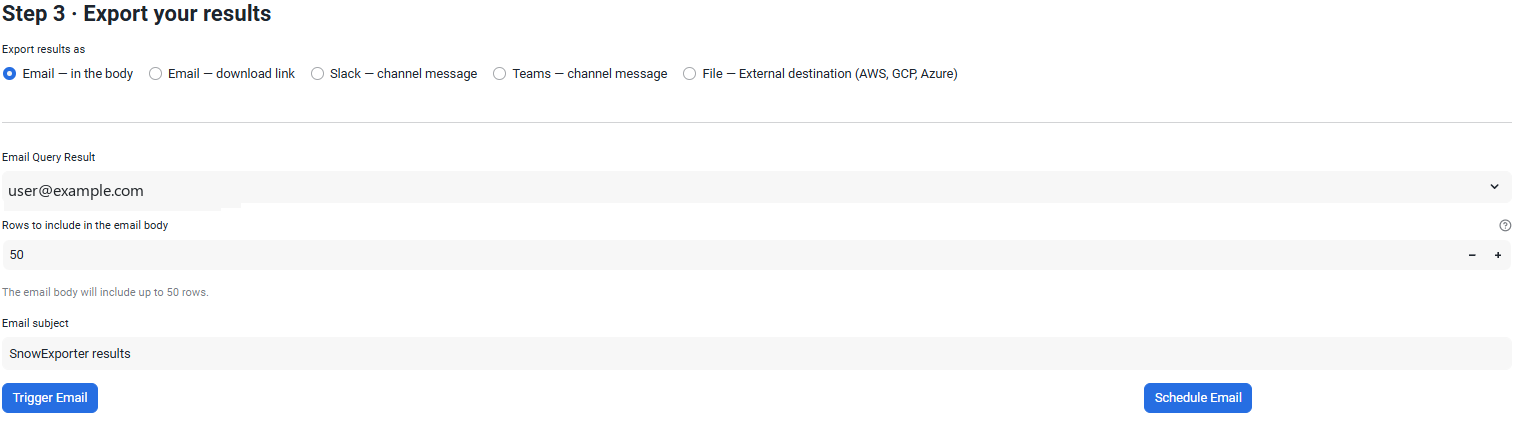
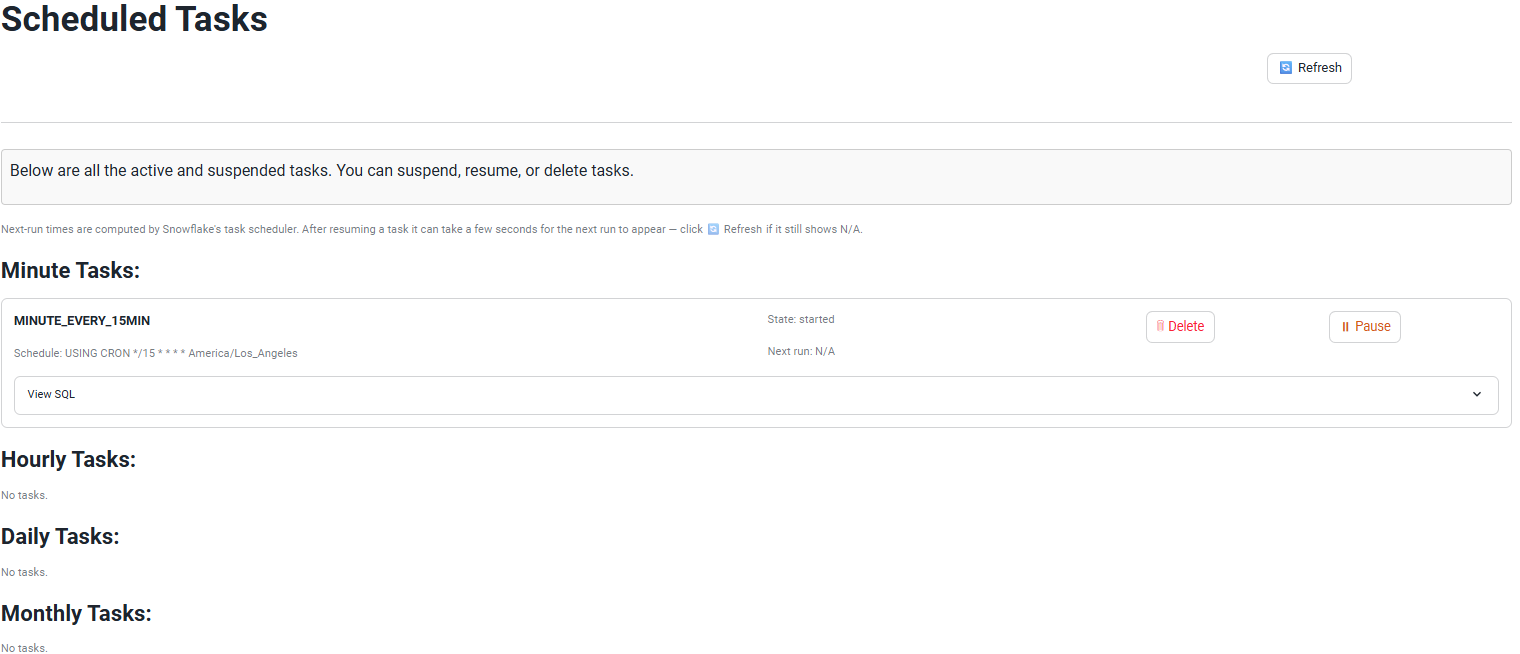
Any export can be scheduled. Cron syntax, your choice of timezone (set once in Settings). Pause, resume, or delete schedules from the Scheduled Exports page.
Internal stage, AWS S3, GCP GCS, Azure Blob — define as many destinations as you need. Each destination has a Description and Business Contact so admins document what every endpoint is for and who owns it. Enable or disable each one independently without deleting the configuration.
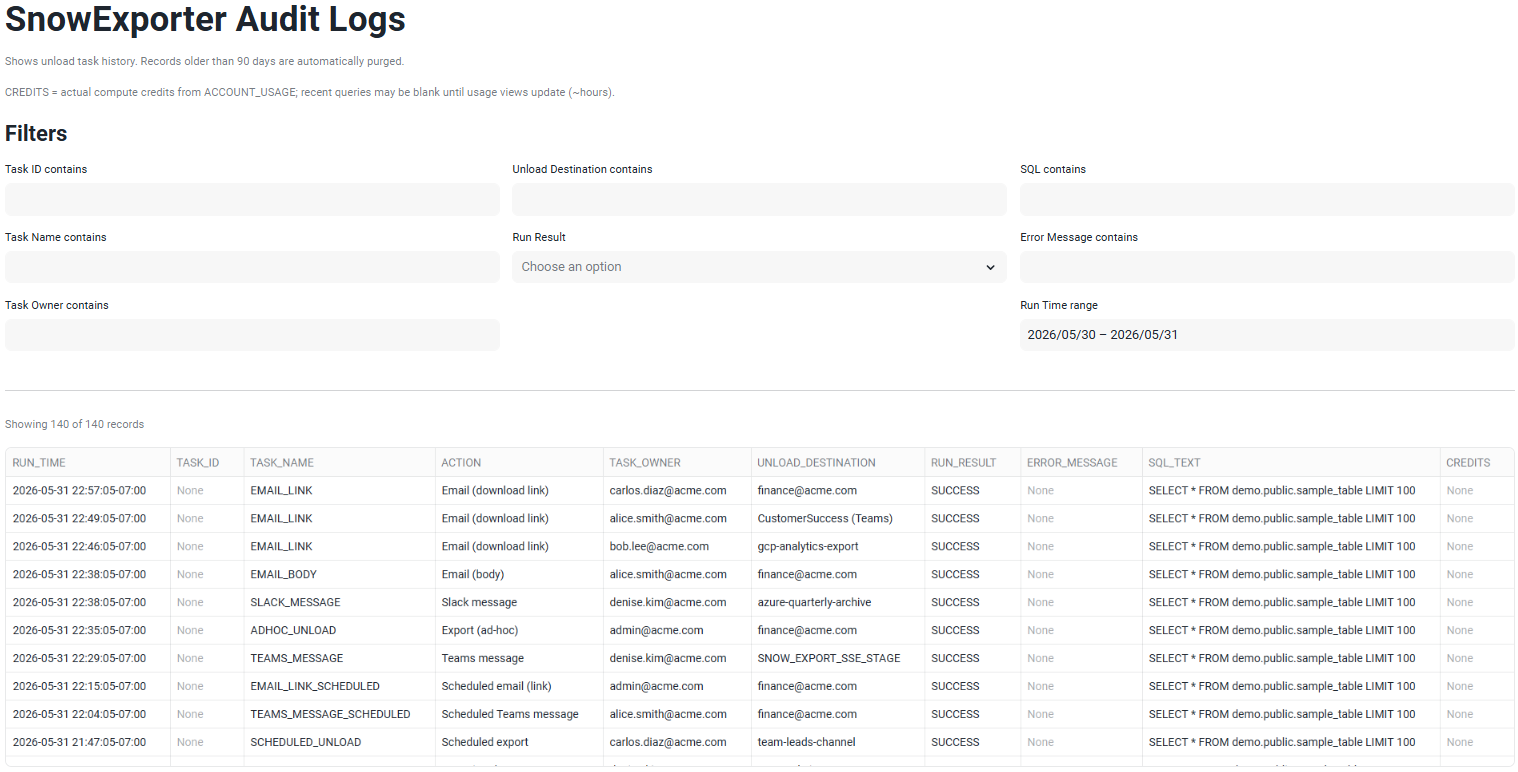
Every email send, file export, and schedule change is logged. The Logs page pulls actual
compute credits per query from ACCOUNT_USAGE.QUERY_ATTRIBUTION_HISTORY, so you
see real cost attribution next to each action — not estimates.
SnowExporter is available on the Snowflake Marketplace. Currently on v2.2 — reverse ETL, compliance enforcement, and every v1.x feature included free.